Power BI Course in Pune Live Classes with PL-300 Exam Preparation
- 1000+ Professionals Trained | Get Hired at ₹2.5 LPA to ₹8 LPA Starting Salary
- 5 Star Rating — 145 Plus Reviews | 85% students get hired within 3 months
Master data visualisation and business analysis with industry-focused Power BI training in Pune. Our course covers data modelling, DAX, interactive dashboards, report publishing, Power Query, and Microsoft PL-300 certificate preparation. Join Power BI classes in Pune with us for live sessions, hands-on projects, and a complete curriculum.
- 2-Month Practical Training With Placement Support
- Learn from Scratch - No Prior Experience Required
- Next Generation Curriculum with Modern Analytics Tools
- Two Year Access to Recordings To Stay Updated
- Real Dashboard and Reporting Projects
- Certificate Aligned to Microsoft - Add to LinkedIn Profile
India's Leading Public Speaking Institute
-->
Free Counselling Session
Talk to our expert advisor and discover the right roadmap for your communication & personality growth.
- Personalized Career Guidance
- Confidence Building Roadmap
- Public Speaking Strategy Session
- Course Recommendation by Experts
Request a Call Back
Fill the form below and our team will contact you shortly.
Investors who believe in us




Power BI is one of the most widely used business intelligence tools in India. It is built by Microsoft, used by companies of every size, and mostly appears in job descriptions across every industry, from IT services to manufacturing to consulting. Everyone uses Power BI.
In Pune, Power BI classes are perfect for those interested in data analytics, reporting, and business intelligence. At Data Skill Hub, we provide basic to advanced MS Power BI certificate courses in Pune with industry experts. Every session is practical, every module is real, and the course prepares you for the Microsoft PL-300 certificate too. It is one of the most in-demand credentials for data professionals in the Pune job market. You can unlock the power of data visualisation with our advanced Power BI course.
Our Power BI training program will add a valuable resource to your resume and profile. Enrol in our Power BI course and prepare for the PL-300 exam for the Pune job market.
View Table
Course Format | Live Online – Saturday and Sunday |
Session Duration | 2 Hours Per Session |
Total Hours | 40+ Hours (Power Query: 8 hrs, Data Modelling: 6 hrs, DAX: 10 hrs, Visuals: 8 hrs, Service: 5 hrs, PL-300 Prep: 3 hrs) |
Batch Size | Small Batch |
Topics Covered | Power BI Desktop, DAX, Power Query, Data Modelling, Reports, PL-300 |
Certification | Data Skill Hub Certificate + PL-300 Exam Prep |
Placement Support | Resume Building, Mock Interviews, LinkedIn Optimisation, Job Referrals |
Doubt Support | 9 AM to 9 PM – Direct Mentor Access |
Session Recordings | Available for Every Class (1 Year Access) |
Projects | Real Business Dashboards Built in Every Module |
Free Demo | Available Before Enrollment – No Commitment |
Master Every PL-300 Exam Topic with Our Power BI Training
At Data Skill Hub, the Power BI course with Microsoft PL-300 exam preparation is a part of our program. Power BI is a Microsoft business analytics service that transforms raw and messy data into clean and interactive dashboards, making tasks easy for companies. In this Power BI course, we include PL-300 exam preparation as a part of the curriculum. The Microsoft PL-300 certificate is one of the most in-demand credentials for data jobs in India. Here is what our course covers-
PL-300 Exam Topic Weightage
PL-300 Exam Topic | Weightage in Exam | Hours Covered |
Prepare the Data (Power Query) | 25-30% | 8 Hours |
Model the Data (Data Modelling, DAX) | 25-30% | 16 Hours |
Visualise and Analyse the Data (Reports, Dashboards) | 25-30% | 8 Hours |
Deploy and Maintain Assets (Power BI Service, RLS) | 15-20% | 5 Hours |
Every topic in the PL-300 exam will be covered in our Power BI training. We make you ready with practice questions, mock tests, time management strategies, and exam-day guidance. Students who complete the course and put in revision time consistently can pass the PL-300 exam.
A PL-300 certification on your resume tells Pune employers that your Power BI skills have been validated by Microsoft – not just by a course certificate. It makes a measurable difference in getting shortlisted for Power BI roles.
Note: The PL-300 is a paid Microsoft exam. Data Skill Hub prepares you thoroughly for it. Exam registration is done separately through Microsoft’s official channels.
What You Will Learn Complete Curriculum in Our Power BI Course in Pune 🚀
At Data Skill Hub, we cover comprehensive Power BI modules. Let’s check out –
Introduction to Power BI (2 Hours)
- What is Business Intelligence (BI)?, Different BI Tools in the Market, Why Power BI?
- Stages Involved in Power BI, Power BI Components, Architecture of Power BI, Building Blocks of Power BI
- Power BI Installation , User Interface – Power BI Desktop , User Interface – Power Query
Outcome: You will understand what Power BI is, how it works, and navigate the Power BI Desktop and Power Query interfaces with confidence.
Connecting to Data Sources (3 Hours)
- File Sources: Connect to Excel, CSV, Folder, PDF, Multiple Excel Workbooks & Worksheets
- Online Sources: Connect to Webpage, SharePoint List & Folder, Dataflow, API
- Database Sources: Connect to SQL Server , SQL Statement , Import Query vs Direct Query
Outcome: You will connect Power BI to Excel files, CSV files, web pages, SharePoint, SQL Server, and APIs from multiple sources.
Power Query - Data Transformation (8 Hours)
- Transform Data: Promote Header , Detect Data Type , Fill Down , Group By , Pivot & Unpivot Column , Split Column , Extract Data , Rename & Move Columns , Transpose , Merge Cells
- Combine Data: Append Data (Manual & Auto) , Merge Data (Single & Multi Column, Enable Load
- View Options: Query Setting, Column Quality, Distribution & Profile, Profile Based on Entire Dataset
- Add Column: Custom Column, Conditional Column, Column from Example, Date & Time Column
- Home Options: Refresh Data, Data Source Setting, Advanced Editor, Keep & Remove Rows, Close & Apply
- General Features: Duplicate & Reference Query, Dynamic Path, Manage Parameter, Remove Errors, Remove Top Row
Outcome: You will clean, transform, merge, append, and unpivot messy data from any source using Power Query’s ETL features.
Data Modelling - Building Relationships (6 Hours)
- Why Relationships are Important, Scenarios for Data Modelling, Manage Relationships
- Different Types of Cardinality, Cross Filter Direction, Active vs Inactive Relationship
- Fact Table, Dimension Table, Star Schema
Outcome: You will build relationships between tables, create fact and dimension tables, and design a star schema for efficient data analysis.
Creating Reports & Data VVisualisation(8 Hours)
- Charts & Visuals: Column, Line, Pie, Tree Map, Bubble Map, Filled Map, Table, Matrix, Single & Multi Row Card, Slicer, Funnel, Scatter Plot, Word Cloud, Combo Chart, Histogram, Ribbon, Stacked Bar, Waterfall, Decomposition Tree, Smart Narrative, Q&A, Small Multiple, Image Card, Image Slicer
- Formatting: Page Formatting , Add Image , Shadow & Effects , Custom Theme , Display Unit , Accounting Format , Column, Label, Colour & Axis Formatting
- Interactivity: Drill Up & Down, Single Point Drill, Edit Interaction (Highlight, Filter, None), Conditional Formatting (fx), Filters (Visual, Page, Report Level), Create Groups (Bins & List) Drill Through, Bookmark Navigation, Tooltip, Top & Bottom Values, Sync Slicer, Add Button & Image
- Analytics: Average Line, Constant Line, Trend Line
Outcome: You will create types of charts and visuals, format them professionally, and add interactivity with drill-through, bookmarks, and filters.
Data Analysis Expressions (DAX) - Basic to Advanced (10 Hours)
- DAX Categories: New Column , New Measure , New Table , Visual Calculation , Quick Measure
- New Column DAX: Multiply, Addition, IF, Switch, DATEDIFF, RELATED, USERELATIONSHIP
- New Table DAX: CALENDARAUTO, Financial Year Table, SUMMARIZE, FILTER, GENERATESERIES
- New Measure DAX: CALCULATE, FILTER, ALL, ALLSELECTED, ALLEXCEPT, HASONEFILTER, ISFILTERED, SAMEPERIODLASTYEAR, DATEADD, DATESINPERIOD, PREVIOUS Week/Month/Quarter/Year, DATESBETWEEN, LASTDATE, FIRSTDATE, MINX, MAXX, SUMX, DISTINCTCOUNT, COUNTROWS, Variables in DAX
- Quick Measures: Time Intelligence , YOY Percentage , Running Total , MTD , YTD , Rolling Average
- Visual Calculation: Create Moving Average
Outcome: You will write DAX formulas for new columns, measures, and tables, including time intelligence, running totals, and YOY calculations.
Explore Different Panes in Power BI (2 Hours)
- Data Pane , Visualisation Pane , Filter Pane , Bookmark Pane , Selection Pane , Sync Slicer Pane , Optimisation Pane
- Report View , Table View , Model View , DAX View
- Table Properties, Column Properties, Featured Column
Outcome: You will confidently use all Power BI panes, including Data, Visualisation, Filter, Bookmark, Selection, and Optimisation panes.
Power BI Service - Cloud Sharing & Collaboration (5 Hours)
- Workspace & Roles: User Interface Overview, Create Workspace, Add Users, Assign Roles, Different Types of Roles
- Dataset & Dataflow: Understand DATASET & DATAFLOW, Create DATAFLOW, Scenarios to Use DATAFLOW
- Reports & Dashboards: Publish Report in Workspace, Create RLS (Static & Dynamic), Lineage View, Create Dashboard from Multiple Reports, Understand Dashboard Concept & Tiles
- Sharing & Export: Personal Gateway, Schedule Refresh, Set Alerts, Export to PDF, Excel, PowerPoint, Share via Link, Outlook & Microsoft Teams
- Mobile: Create Mobile Layout, View on Mobile App, Public Links
Outcome: You will publish reports, create workspaces, share dashboards, schedule refreshes, set up row-level security, and collaborate with teams.
PL-300 Exam Preparation (3 Hours)
- Prepare the Data, Model the Data, Visualise and Analyse Data, and Manage and Secure Power BI
- Exam Question Datasets, Practice Mock Tests, and Study Guides as per Exam Pattern
Outcome: You will be fully prepared to pass the Microsoft PL-300 exam with practice tests, study guides, and exam strategies.
Bonus Module: AI-Powered Power BI Techniques (2 Hours)
- Using ChatGPT for DAX Formulas, Using Copilot for Data Analysis
- AI-Powered Insights and Narratives, Automating Report Generation with AI
Outcome: You will use ChatGPT to generate DAX formulas, Copilot for data analysis, and AI tools to automate insights and report generation.
20+ Tools you will learn


Who Can Join Our Power BI Classes in Pune?
At Data Skill Hub, our Power BI classes in Pune are ideal for those interested in data analytics, reporting, and business intelligence. Anyone who wants to master Power BI and prepare for the PL-300 exam. Here is the list of who can enrol in our course:

Data Analysts and Aspiring Analysts

MIS Executives

Business Analysts

Reporting Professionals

IT Professionals

Finance and Accounting Professionals

Marketing Professionals

College Students

Working Professionals (Non-IT)

Job Seekers
Minimum Requirements :-
- Laptop with 8GB RAM (Windows 10 or above)
- Internet connection: 10 Mbps minimum
- No prior Power BI knowledge required
- No age limit – 20 to 50 years

Real Projects You Will Build (6+ Projects)
With our hands-on, practical training, you will learn from real projects. Here are some of the projects:
Project 1
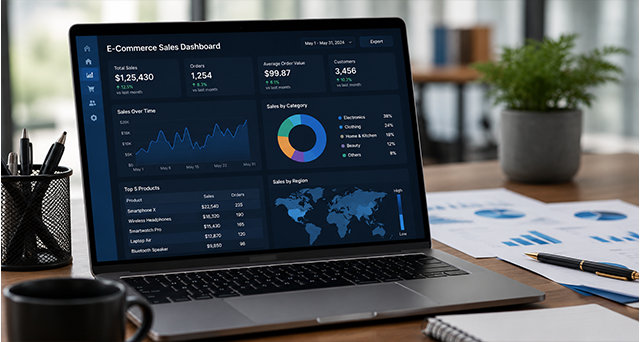
E-commerce Sales Dashboard (Power BI)
Build an interactive dashboard showing sales trends, top products, regional performance, and customer insights using real e-commerce data. Learn data modelling, DAX measures, and interactive visualisations.
Project 2
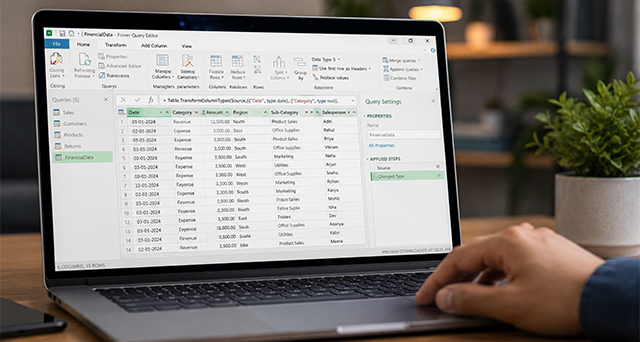
Financial MIS Report (Power Query)
Clean and transform messy financial data using Power Query. Merge multiple files, remove errors, unpivot columns, and create a clean dataset ready for analysis.
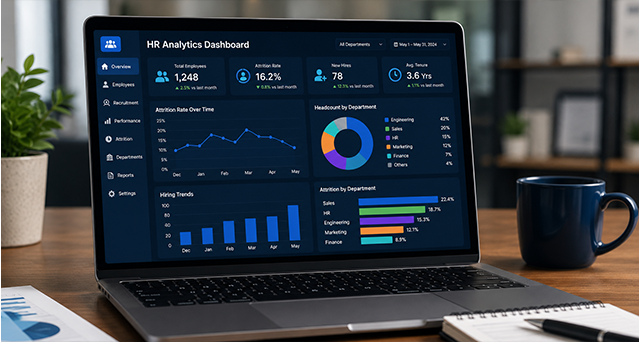
Project 3
HR Analytics Dashboard (Power BI)
Analyse employee attrition, headcount, hiring trends, and department-wise performance. Create KPIs and interactive filters for HR managers.
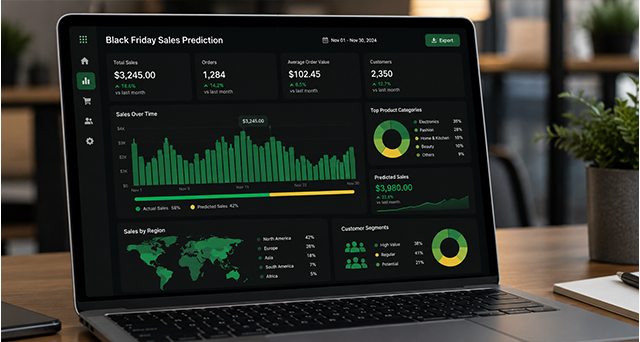
Project 4
Customer Segmentation (DAX)
Create calculated columns and measures to segment customers by behaviour, purchase frequency, and revenue contribution.
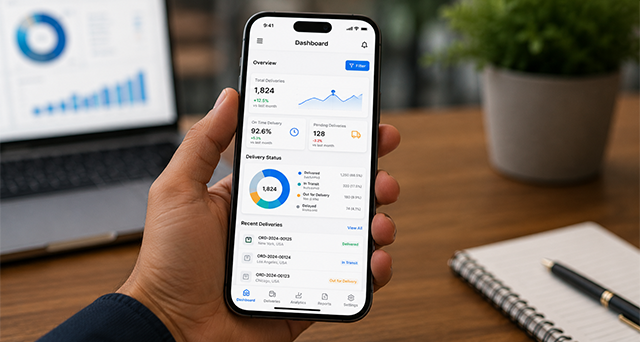
Project 5
Mobile-Optimised Executive Dashboard
Create a dashboard that works perfectly on mobile devices. Use bookmarks, buttons, and navigation for executive users.
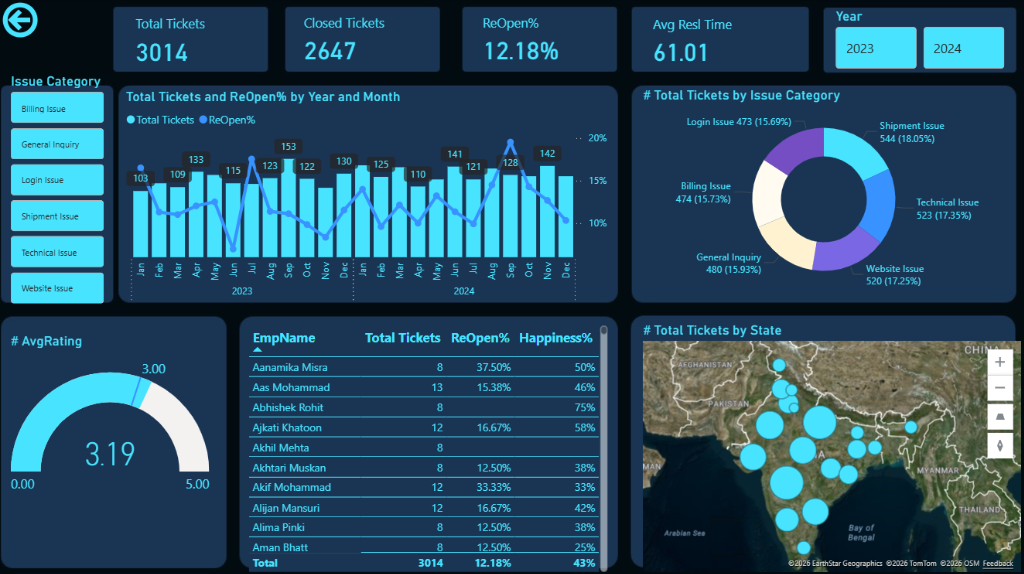
Project 6
Learning effectiveness Analysis ( power bi )
Power BI enables real-time reporting, trend analysis, and actionable insights that enhance the overall effectiveness of training initiatives.
Note:- You can use projects as your portfolio. With this, recruiters will see exactly what you can do.
Get access to 20+ skilling courses
Expert-taught Courses like:
Advanced Excel & Office 365 Mastery
- Power BI Expert
- Power Query + Power Pivot
- SQL Server
- Python for Data Analysis
- Excel VBA Macro
- Power Point Presentation
Why Choose Data Skill Hub for Power BI Training in Pune?
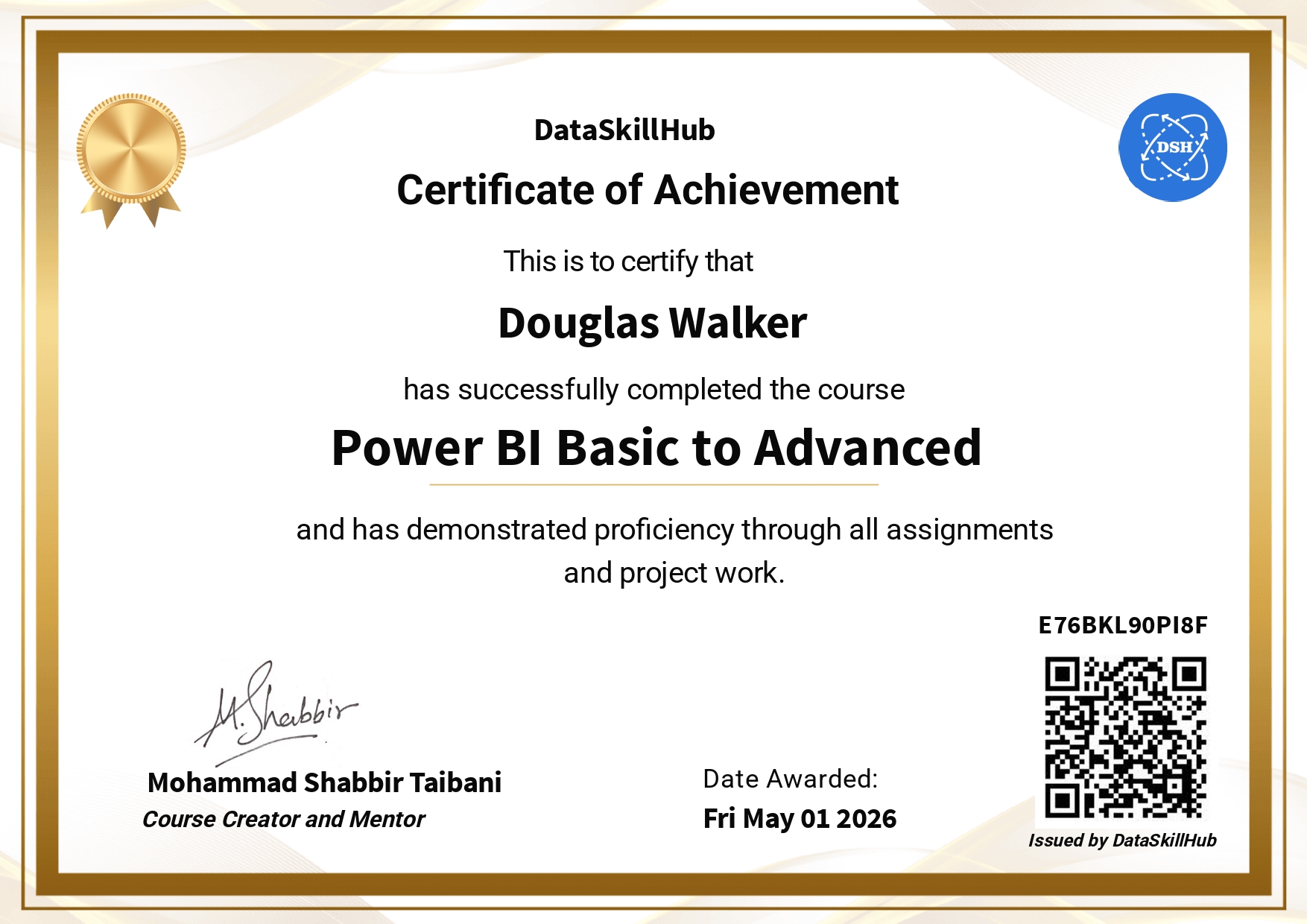
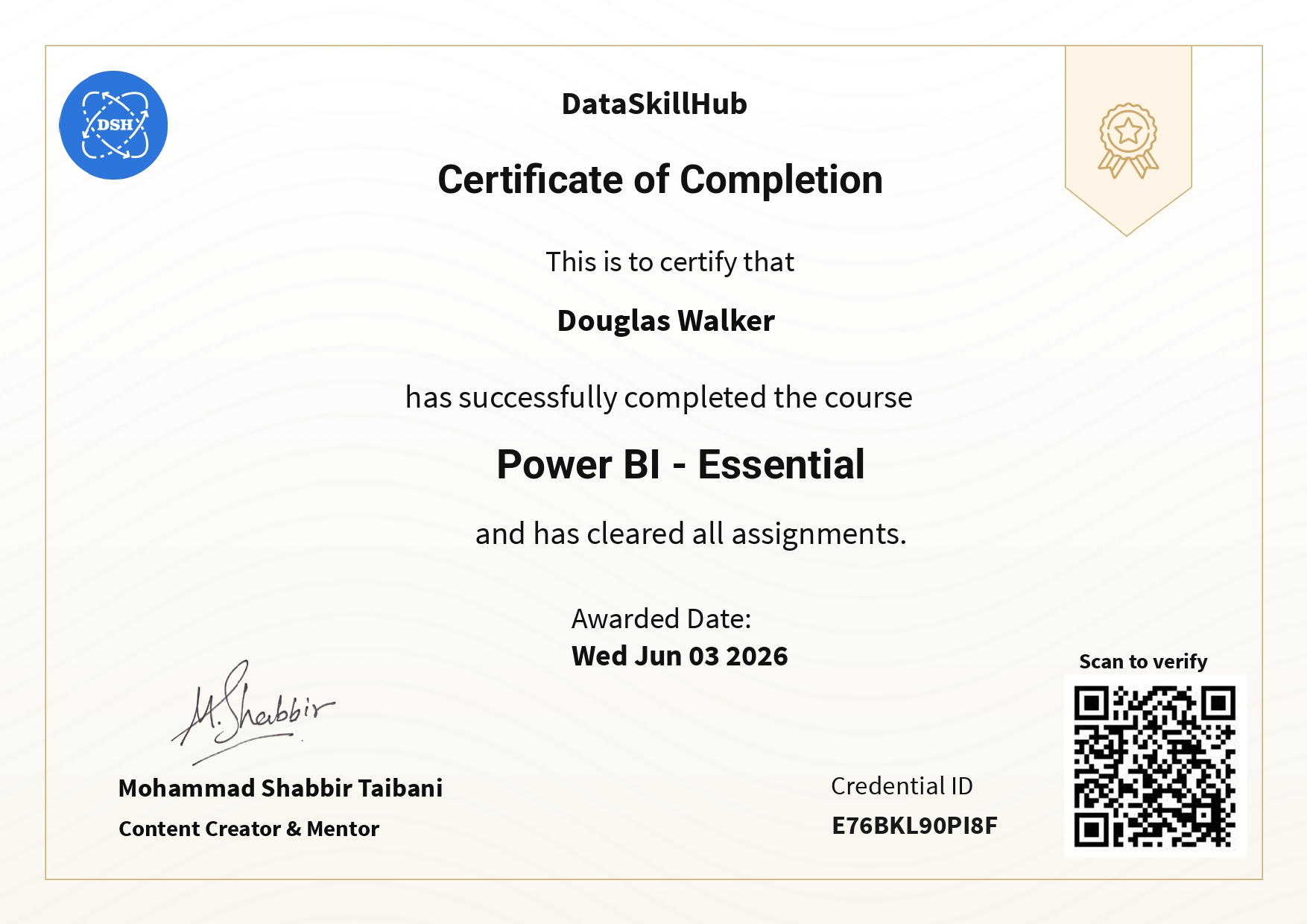
When you complete the Certified Data Analytics Mentorship Program at Data Skill Hub, you do not just walk away with the knowledge. You will also get an industry-certified, industry-recognised certification. Our certificate is well recognised in Pune’s competitive market.
Feature | Data Skill Hub | Other Institutes |
Batch Size | Small | Unlimited |
Total Hours | 40+ Hours | 20-25 Hours |
Live Sessions | Yes, with the founder directly | Batch classes only |
PL-300 Exam Prep | Included in the course | Paid add-on |
AI Integration | ChatGPT, Copilot | Rarely covered |
1 Year Recorded Access | Yes | 3 months only |
Placement Support | Resume, mock interviews | Basic support |
Free Demo | Before enrollment | Rarely offered |
Real Projects | Yes | No |
Live Sessions
All Power BI classes are live. You will not just get recorded sessions. We conduct live sessions with practical projects.
Expert Trainer
Learn from an experienced trainer named Mohammed Shabbir, who holds real expertise in Power BI, DAX, and dashboard development.
PL-300 Exam Preparation
Being the best Power BI training institute in Pune, we also help you prepare for the PL-300 exam. It is part of the course, not a paid add-on.
Weekend Classes
Our classes are conducted every Saturday and Sunday, which is easily accessible for working professionals and students.
One Year Support
Once you join our course, you will get access to 6 months of live classes and one year of access to recorded sessions.
Free Demo Session
Not sure yet? Attend a free demo session before paying a single rupee. See the teaching style, meet the mentor, and decide with zero risk.

Meet Your Advanced Excel Course Mentor Mohammed Shabbir
Mohammed Shabbir is the founder of Data Skill Hub and the lead instructor for all programs. He is a certified data analyst with 8+ years of industry experience in corporate reporting, MIS automation, and dashboard development.
- Students Trained: 1000+ professionals
- YouTube Subscribers: 2,000+ with 125+ free lectures
- Teaching Style: Simple explanations, real business scenarios, hands-on practical approach
Power BI Course Fees in Pune
Power BI alone is just ₹15,000 (incl. GST). But here’s the smart move — for only ₹3,000 more, add Power Query (worth ₹12,000) and master the two most in-demand skills in Pune’s job market.
2-month practical course • No hidden charges
POWER BI ONLY
📊 Power BI course
₹15,000
₹18,000
incl. GST
Save ₹3,000 on Power BI
- 40+ hours of live Power BI training
- 8+ hands-on projects & PL-300 exam prep
- 1-year access to recordings
- Doubt support, placement guidance & certificate
BEST VALUE • MOST POPULAR
🚀 Combo: Power Query + Power BI
₹18,000
₹30,000
incl. GST
Save ₹12,000 — get Power Query (worth ₹12,000) for just ₹3,000 more
- Everything in the Power BI course
- Plus complete Power Query (data transformation)
- The 2 most in-demand skills in Pune
- End-to-end: clean, transform & visualise data
Power BI Certification in Pune Microsoft PL-300 Exam Preparation
The Microsoft PL-300 Power BI Data Analyst Certificate is one of the most recognised Power BI credentials for data professionals in India. It is issued by Microsoft directly. It gives you credibility at a global level.
Most of the top companies in Pune across IT, BFSI, consulting, and enterprise sectors are looking for Microsoft PL-300 certified individuals. Once you complete your Power BI training with us, we will issue a Data Skill Hub certificate to you. This certificate also adds credibility to your resume profile and is well recognised by industries.
Step 01
Book a Free Demo
Not ready to enrol yet? Book your free demo session at no cost. See exactly what you will learn and how you will learn.
Step 02
Get in touch
Call or WhatsApp on 8293829378 to join the classes. You can even talk about batch timing and other schedules.
Step 03
Register yourself
Register yourself with your details, such as your name and email address, and create an account.
Step 04
Confirm your admission
Pay the course fee (or choose 0 Cost EMI) and start accessing our ongoing classes.
Step 01
Book a Free Demo
Not ready to enrol yet? Book your free demo session at no cost. See exactly what you will learn and how you will learn.
Step 02
Get in touch
Call or WhatsApp on 8293829378 to join the classes. You can even talk about batch timing and other schedules.
Step 03
Register yourself
Register yourself with your details, such as your name and email address, and create an account.
Step 04
Confirm your admission
Pay the course fee (or choose 0 Cost EMI) and start accessing our ongoing classes.
Note: We accept all payment methods: UPI (GPay, PhonePe, Paytm), Credit Card, Debit Card, Bank Transfer
Refund Policy: Try our free demo session before paying a single rupee and know more about our refund policy.
How to Attend Power BI Classes in Pune?
Follow the steps mentioned below to attend Power BI classes in Pune:
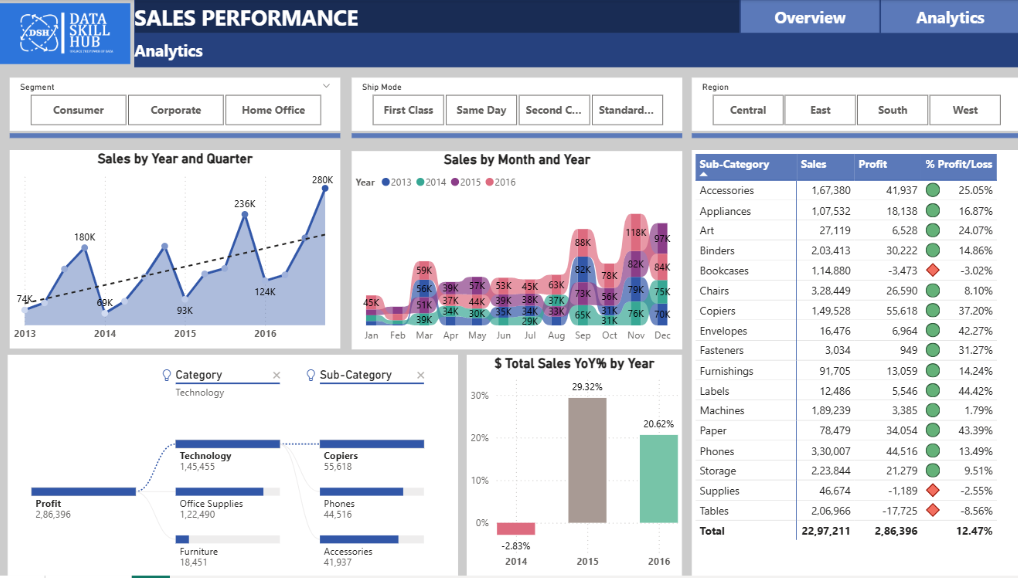
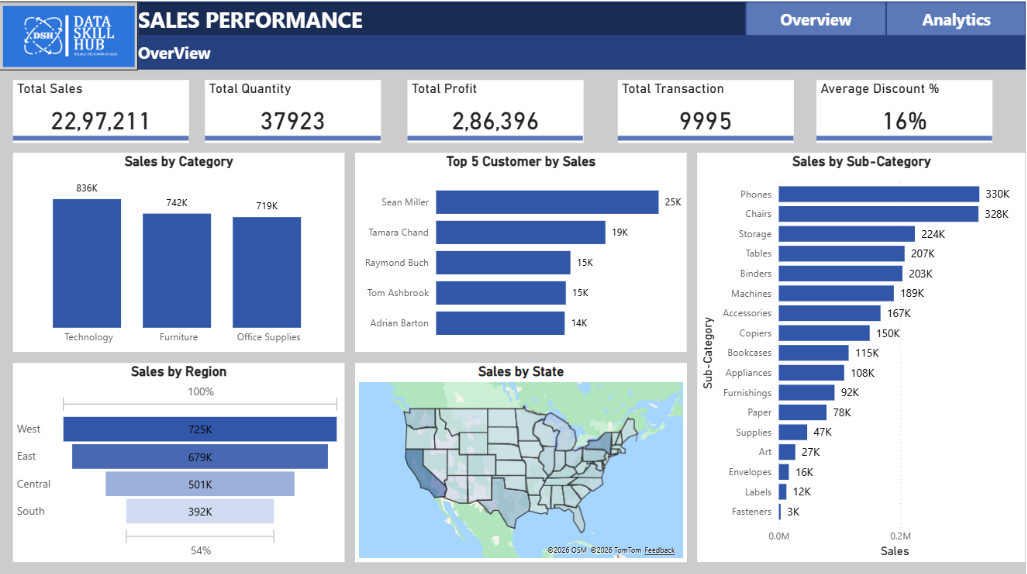
These are Actual Dashborad created by Student
With our hands-on, practical training, you will learn from real projects. Here are some of the projects:
Project 1
Sales Analysis Dashboard
Analyse sales data to identify top-performing products, regional trends, and revenue insights using Excel & Power BI
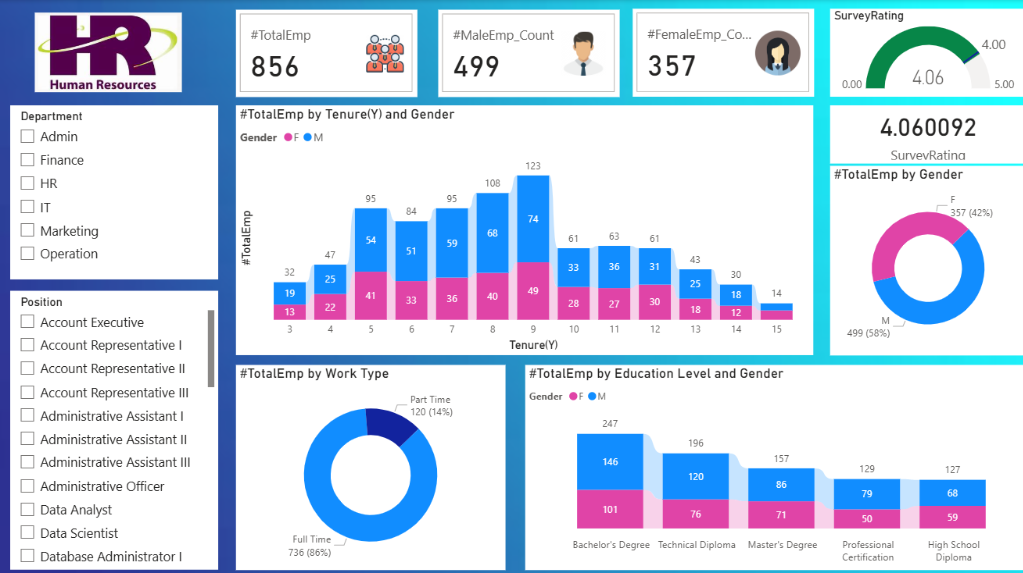
Project 2
HR Analytics Report
Work with employee data to track attrition, performance, and workforce trends for smarter HR decisions. Excel power bi , Power query
Project 3
Customer Satisfaction Analysis
Analyse customer feedback data to identify pain points, satisfaction scores, and improvement areas. SQL Power BI
Project 4
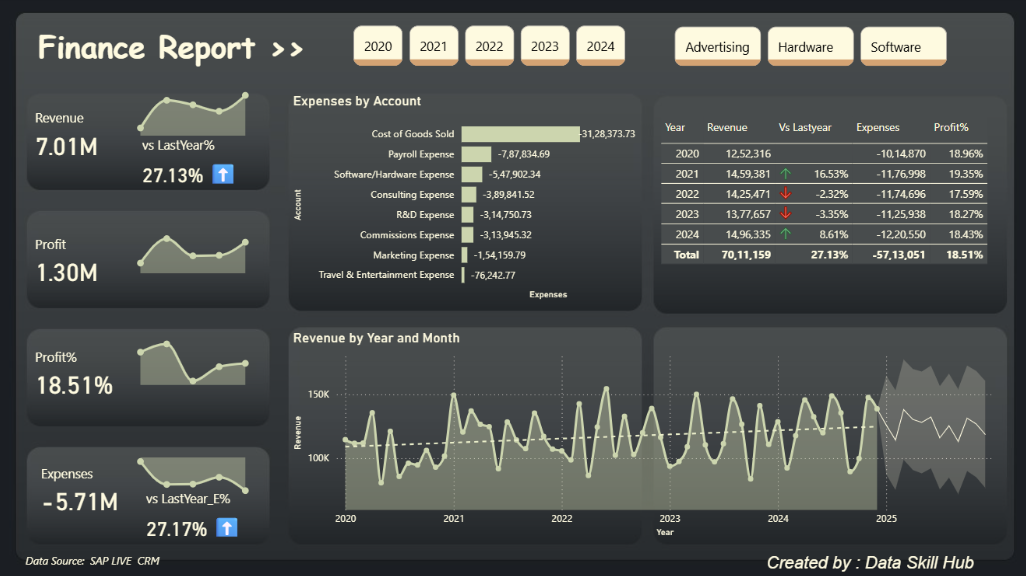
Financial Performance Dashboard
Build an interactive finance dashboard tracking revenue, expenses, and profitability KPIs. Excel DAX Power BI
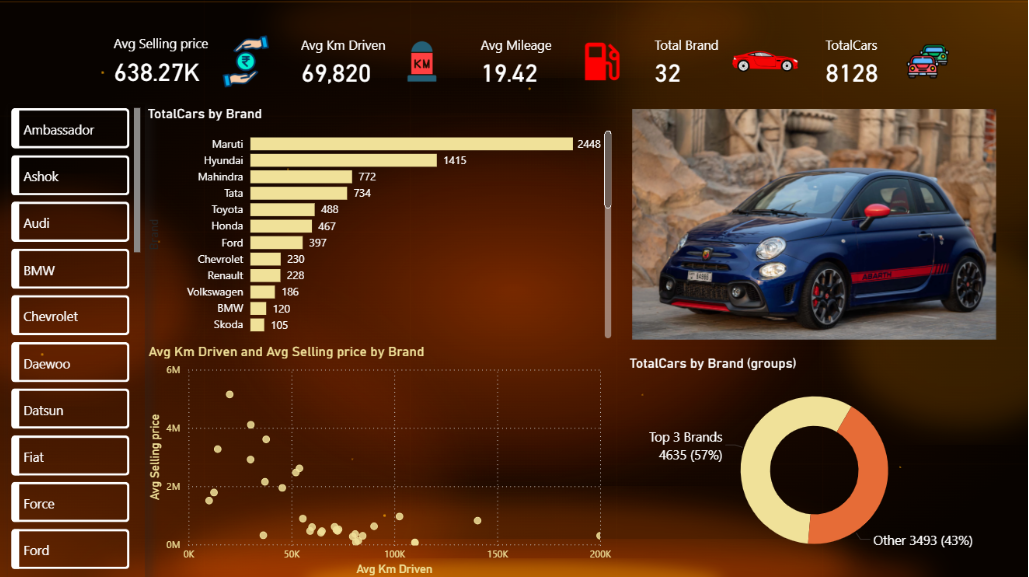
Project 5
Used Car Market Analysis
Explore pricing trends, brand performance, and buyer behaviour from real used car listing data. Power BI , Advanced DAX
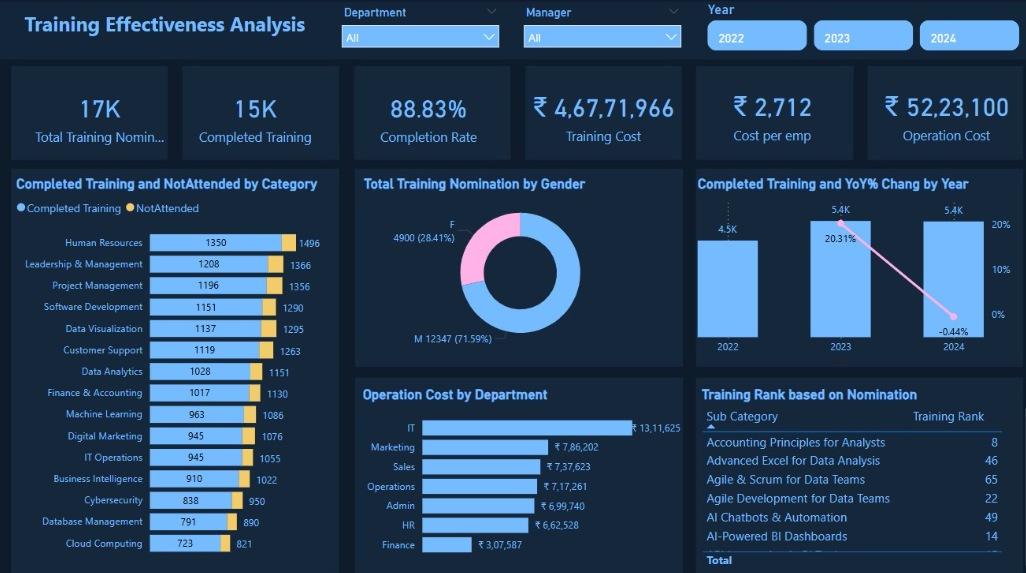
Project 6
Learning & Development Dashboard
Track training completion, skill gaps, and employee development metrics across departments
Frequently Asked Questions
An entry-level Power BI professional in Pune can earn up to ₹3.5 LPA to ₹5 LPA. After 2-3 years of experience, you can see salary hikes of 40 to 60 per cent. Experienced Power BI developers earn ₹8 LPA to ₹12 LPA in Pune.
Yes, we provide full placement assistance once your completed your Power BI course. Our trainer will help you in resume building guidance, mock interview preparation, LinkedIn profile optimisation, as well as connecting you to the recruiters. We are in touch with 3000+ companies for placement.
Data Skill Hub’s Power BI course is conducted in small batches. So, trainers are able to give personalised attention to each student. In addition, our course covers PL-300 exam preparation. We make you ready for the exam in no time. If you want to learn PowerQuery, we have a combo offer.
During Data Hub Skill’s Power BI course, we cover real business projects like E-commerce Sales Dashboard, Financial MIS Report (Power Query), HR Analytics Dashboard, Customer Segmentation (DAX), Inventory Management Report, Supply Chain Analysis, Financial Forecasting Dashboard, Mobile-Optimised Executive Dashboard, etc.
At Data Skill Hub, all AI tools are integrated across all modules in a dedicated module. You will learn to use ChatGPT for DAX formulas, Microsoft Copilot for faster dashboard creation, AI-powered insights and narratives, and automating report generation with AI.
Yes. Our certificate is well- recognised by recruiters and hiring managers across Pune's IT and corporate sector. Whether you're applying to TCS, Infosys, Wipro, Accenture, KPMG, Bajaj Finserv, etc, our certificate will add credibility to your profile.
Our Power BI course is fully live and online, easily accessible from anywhere in India. Whether you are a student or a professional, you can easily join our class. Students are always welcome without any eligibility requirements.
The Microsoft PL-300 is an official Microsoft certificate for the Power BI Data Analyst. It is a paid test by Microsoft that you must complete and pass to acquire the PL-300 certificate. It is globally recognised and verifiable. If you are applying for a job in the Pune job market, this certificate proves that your Power BI skills have been verified by Microsoft. It adds a lot of credibility to your resume.
Our Power BI course typically takes 2 months to complete. We conduct two live sessions per week, which include PL-300 exam preparation and practical training on real projects. Every module requires time. Hence, it goes for 2 months.
Yes, you can surely get a job in Pune after completing our Power BI course. This course adds more credibility to your resume. It is good to pass the PL-300 certificate, which assures your Power BI skills. These skills are highly in demand for Power BI Developer, BI Analyst, Data Analyst, and MIS roles in Pune companies.
If you have some Power BI basics, it is still good to choose our basic to advanced Power BI program or Data Analyst Mentorship Program. A self-taught Power BI user often has gaps in data modelling and DAX - the two areas that matter most for professional roles. It is up to you if you want advanced Power BI basics or a comprehensive data analyst program.
No, we do not provide the PL-300 certificate. Instead, we help you prepare for the exam. We provide PL-300 exam preparation material like practice assessments, study guides, and mock tests every weekend so you can get prepared for the exam.
Yes, you can join our Power BI classes even if you are working. We provide weekend flexible classes that are absolutely comfortable for working professionals. All you need is two hours on Saturday and Sunday to attend the class.
Start Your Power BI Journey in Pune - Enrol Today
Every alternate month, we start a new batch.